

This is only of interest for users who rely on email notifications of new posts to a thread you started, or are watching.
As you probably noticed, the default setting in this new forum software sends only one email notification and then stops sending anything until you visit the forum. There's alogic in this, as it avoids mail overload if you leave your computer for a few days. However, you can also miss important posts.
We now have a plug-in installed that gives you the option to override that, and receive an email for every new post in a thread you are watching. The default setting is "off" so you have to intentionally turn this on. Here's how:
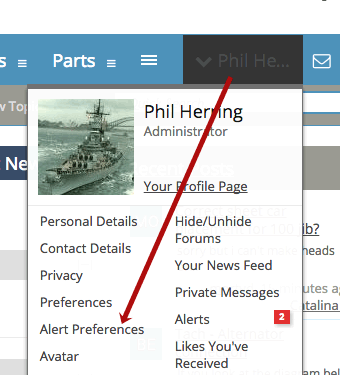
Put your mouse over your username in the upper right. Select Alert Preferences
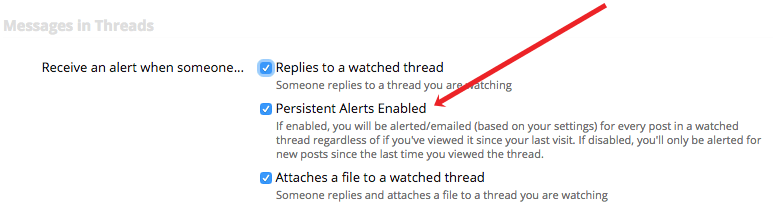
On the next screen, the setting is in the top group. Just check the box as shown:
As you probably noticed, the default setting in this new forum software sends only one email notification and then stops sending anything until you visit the forum. There's alogic in this, as it avoids mail overload if you leave your computer for a few days. However, you can also miss important posts.
We now have a plug-in installed that gives you the option to override that, and receive an email for every new post in a thread you are watching. The default setting is "off" so you have to intentionally turn this on. Here's how:
Put your mouse over your username in the upper right. Select Alert Preferences
On the next screen, the setting is in the top group. Just check the box as shown:


