Having installed Garmin gear (and I love Garmin), you have to be aware of what hardware to buy to accommodate the functions you wish to see on that 7" screen. If you decide to buy two readouts, make sure each of the screens have the ports to accommodate your needs. Like a port for the depth sounder transducer, port for the radar, wind machine, speedo, etc. It adds up and you can run out of ports. So, you network between the two screen readouts so that you can share the data. Again, some of the screen models might not have all that you need. In that case you spend another $270 to get a Garmin GMS-10 Network Port Expander. This guy has 5-6 network ports that can be mounted near one of the screens. So, you can add more network cables to accommodate the extra devices that go beyond the available ports in the back of your readout screen housing. You just have to buy the number of network cables (if they don't come with the device) and figure out how to run them between your stuff. It's all plug and play and pretty simple - as long as you know what you need to match it all up. Definitely it's a DIY thing, unless you simply can't wrap your mind around the easy to read instructions.

Another Electronics Question
- Thread starter john6206
- Start date

Installing the new equipment is both hard and easy. Its usually hard to route all the network cable if you need new cables. But the actual connections are super simple with the new NMEA2000 systems. Id do a 5-10 min read on the basics of NMEA2000 networks.
I recently upgraded my 15 year old chartplotters. Its a little mind blowing what the new tech can do. The number of options can be overwhelming, but the more I use it and learn the ins and outs, the more I like it. .
I recently upgraded my 15 year old chartplotters. Its a little mind blowing what the new tech can do. The number of options can be overwhelming, but the more I use it and learn the ins and outs, the more I like it. .
Not sure what you are describing by ports and running out of them. All of these to my knowledge use NMEA2000, which is a backbone and drop cable system. There only needs to be one NMEA2000 "port" on each device, and all of them share information over the single backbone cable.Having installed Garmin gear (and I love Garmin), you have to be aware of what hardware to buy to accommodate the functions you wish to see on that 7" screen. If you decide to buy two readouts, make sure each of the screens have the ports to accommodate your needs. Like a port for the depth sounder transducer, port for the radar, wind machine, speedo, etc. It adds up and you can run out of ports. So, you network between the two screen readouts so that you can share the data. Again, some of the screen models might not have all that you need. In that case you spend another $270 to get a Garmin GMS-10 Network Port Expander. This guy has 5-6 network ports that can be mounted near one of the screens. So, you can add more network cables to accommodate the extra devices that go beyond the available ports in the back of your readout screen housing. You just have to buy the number of network cables (if they don't come with the device) and figure out how to run them between your stuff. It's all plug and play and pretty simple - as long as you know what you need to match it all up. Definitely it's a DIY thing, unless you simply can't wrap your mind around the easy to read instructions.
The backbone can consist of just a series of Tee connectors - one for each device.
All of this is super simple to setup and connect.
Mark

jssailem
SBO Weather and Forecasting Forum Jim & John
- Oct 22, 2014
- 24,745
I remember those days of cassette tape strips rather than Mom’s knitting yarn. I think it was from “Happy Holidays Vol 20 something”. Who would destroy songs like “Baby I a Want You” or “Stuck on You”. One cassette could supply a year of tell tails for the racing fleet of Lido 14’s on Glorietta Bay.
While there are similarities, we all sail in our own local waters. There is no “one size fits all”. Mark dealing with 400 big ships in the harbor; the Puget Sound having a mix of Ferries, Cruise Ships and Commercial Fishermen moving about at varying speeds in fog conditions. For me a 7” screen would not be big enough even though it fits a specific space at the helm. I kind of feel the sweet spot for most 30-45 foot boats is 9” screen. I chose a 12” screen and it allows me to have Radar and Chart on a split screen. It sits at the NAV station. While visible from the companion way it is beyond my access while at the helm. I am looking for an articulating arm to allow me to rotate it into the companion way for those foggy days when you need a radar/ais screen to extend your situational awareness.
As Mark states “having visual data keeping one from actually looking outside the boat, that is a personal”. I agree. As guests aboard take a turn at the helm, I watch them focus first on screens or the compass trying to steer within some imaginary lines. Only halter urging them to pick a spot on the horizon and steer towards it (only works when sailing in coastal waters) do they relax and begin to experience the beauty of sailing. It is a freeway or on the water, but you are allowed to wander over the lines.
Plan your clean out of the tech gear, but perhaps cruise a season to see what skills you already own support your needs. Then add the extra sensor displays you want that compliment your needs.
While there are similarities, we all sail in our own local waters. There is no “one size fits all”. Mark dealing with 400 big ships in the harbor; the Puget Sound having a mix of Ferries, Cruise Ships and Commercial Fishermen moving about at varying speeds in fog conditions. For me a 7” screen would not be big enough even though it fits a specific space at the helm. I kind of feel the sweet spot for most 30-45 foot boats is 9” screen. I chose a 12” screen and it allows me to have Radar and Chart on a split screen. It sits at the NAV station. While visible from the companion way it is beyond my access while at the helm. I am looking for an articulating arm to allow me to rotate it into the companion way for those foggy days when you need a radar/ais screen to extend your situational awareness.
As Mark states “having visual data keeping one from actually looking outside the boat, that is a personal”. I agree. As guests aboard take a turn at the helm, I watch them focus first on screens or the compass trying to steer within some imaginary lines. Only halter urging them to pick a spot on the horizon and steer towards it (only works when sailing in coastal waters) do they relax and begin to experience the beauty of sailing. It is a freeway or on the water, but you are allowed to wander over the lines.
Plan your clean out of the tech gear, but perhaps cruise a season to see what skills you already own support your needs. Then add the extra sensor displays you want that compliment your needs.


If I understand correctly, you have decided to purchase instruments thru the installer and the installer is recommending that you not purchase the 2 instrument displays to save money both on the purchase and the installation? That's not a bad thought but I would recommend that you purchase the navpod that provides enough space for the chartplotter and 2 instruments even if you don't buy the instruments now. I agree with Dave that you don't really want your displays to be limited behind the helm. It is very important to have instrument displays visible from anywhere in the cockpit. But I would install the autohelm control at the helm.
I have pictures of my before and after condition. I bought the boat with a 7" chartplotter mounted underneath the instrument displays. These displays were the older set dedicated to speed, depth & wind. Admittedly, I went overboard with my new installation because I bought a 12" chartplotter where a 9" would probably be more suitable. That said I also installed a new pedestal guard, which necessitated installing the chartplotter at the higher location. It looks very obstructive and top heavy but in practice, it functions well without being obstructive to my field of view (it helps that I'm 6'0"). I also desired to have engine controls on the pedestal at a functional height, so that is what is mounted under the chartplotter. There was a lot more behind these decisions that I care not to elaborate on.
I didn't want my bulkheads cluttered with anything because they make marvelous backrests (I removed those disgusting line pockets) and I had to get creative where to mount 2 instrument displays. I bought a stainless steel handhold that spans the companionway opening and mounted a navpod for 2 instruments. Sorry I don't have a better picture without the lantern in the way. The base of the handhold was very close to the exact opening width but I had to make 2 bases to secure the mounting pads. My installation isn't elegant. The cables exit the back of the navpod and are secured to the back side of the handhold so that you don't see them. I had to drill a hole in the deck to feed the cables into the cabin. The cables come out in the galley ceiling and from there I routed them as discreetly as possible under the glass holder and to the space over the nav station where my NMEA 200 back bone is routed. I hid the cables with teak trim as best I could. It's not a professional looking job but it is effective and I absolutely love, love, love my instrument displays over the companionway. With the c-clamps, the angle of view is adjustable for best viewing. The handhold is a nice addition in its own right when climbing into the cabin with additional security. It is low enough it doesn't block any view. It hasn't restricted any space when climbing into the cabin (that was my biggest concern). And it fits just inside the dodger. I used a Scanstrut cable seal on the deck and it is under the dodger anyway, so water doesn't penetrate.
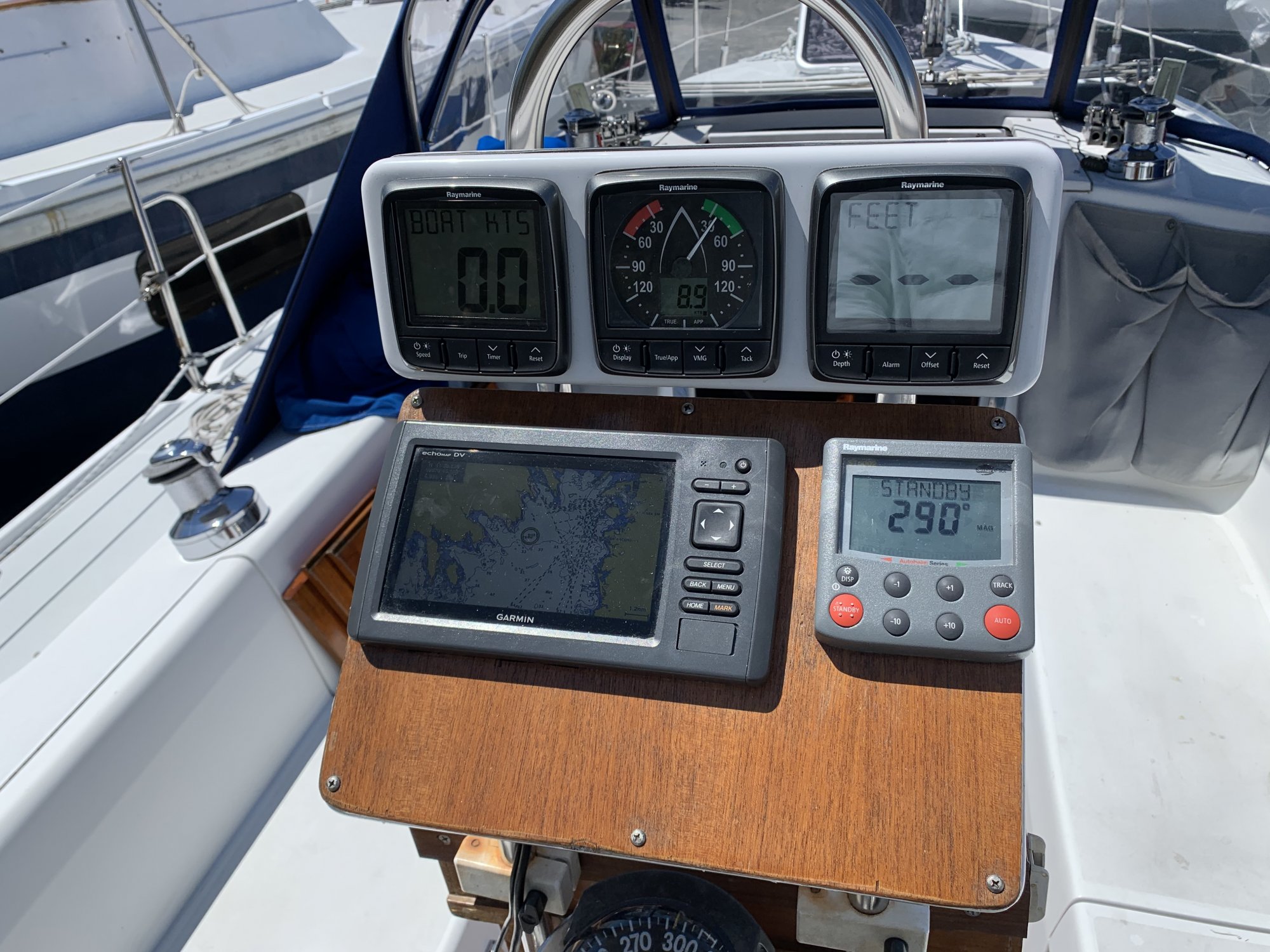
This is what I had when we bought the boat. Your pedestal is probably the same and this shows a 7" cp. If I were you, I would install a navpod large enough to mount the cp and 2 displays so you have room for addition. You can buy the one that does not have pre-cut openings and only cut them out when you ultimately decide what else you want to mount. I would mount it on the lower angled section and leave the upper vertical section bare.
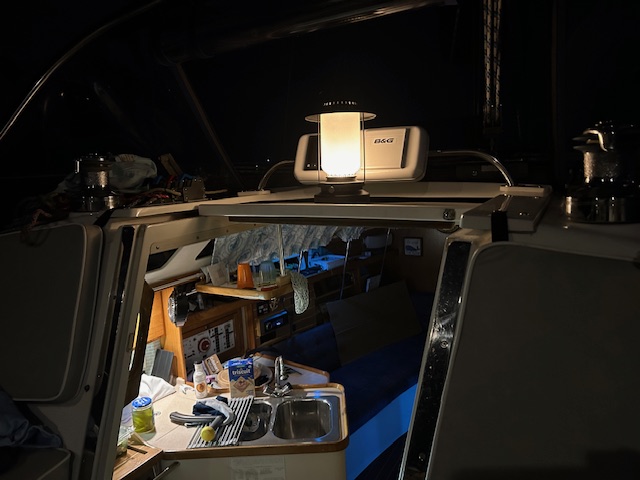
Here is my only picture of the displays over the companionway. Sorry about the lantern in the way. The 2 instrument displays are very, very useful and you will be missing out if you don't mount them somewhere visible in the cockpit. But you can always add them later, after you decide the best location. I posted another picture that shows how top heavy my navpod for 12" cp and and 2 displays look. Functionally, I love it. Aesthetically, I'm not that happy. When I bought the new pedestal guard, I was surprised by its configuration (the new ones changed dimensions - long story) and it left me no other option than to mount it this way.
I have pictures of my before and after condition. I bought the boat with a 7" chartplotter mounted underneath the instrument displays. These displays were the older set dedicated to speed, depth & wind. Admittedly, I went overboard with my new installation because I bought a 12" chartplotter where a 9" would probably be more suitable. That said I also installed a new pedestal guard, which necessitated installing the chartplotter at the higher location. It looks very obstructive and top heavy but in practice, it functions well without being obstructive to my field of view (it helps that I'm 6'0"). I also desired to have engine controls on the pedestal at a functional height, so that is what is mounted under the chartplotter. There was a lot more behind these decisions that I care not to elaborate on.
I didn't want my bulkheads cluttered with anything because they make marvelous backrests (I removed those disgusting line pockets) and I had to get creative where to mount 2 instrument displays. I bought a stainless steel handhold that spans the companionway opening and mounted a navpod for 2 instruments. Sorry I don't have a better picture without the lantern in the way. The base of the handhold was very close to the exact opening width but I had to make 2 bases to secure the mounting pads. My installation isn't elegant. The cables exit the back of the navpod and are secured to the back side of the handhold so that you don't see them. I had to drill a hole in the deck to feed the cables into the cabin. The cables come out in the galley ceiling and from there I routed them as discreetly as possible under the glass holder and to the space over the nav station where my NMEA 200 back bone is routed. I hid the cables with teak trim as best I could. It's not a professional looking job but it is effective and I absolutely love, love, love my instrument displays over the companionway. With the c-clamps, the angle of view is adjustable for best viewing. The handhold is a nice addition in its own right when climbing into the cabin with additional security. It is low enough it doesn't block any view. It hasn't restricted any space when climbing into the cabin (that was my biggest concern). And it fits just inside the dodger. I used a Scanstrut cable seal on the deck and it is under the dodger anyway, so water doesn't penetrate.
This is what I had when we bought the boat. Your pedestal is probably the same and this shows a 7" cp. If I were you, I would install a navpod large enough to mount the cp and 2 displays so you have room for addition. You can buy the one that does not have pre-cut openings and only cut them out when you ultimately decide what else you want to mount. I would mount it on the lower angled section and leave the upper vertical section bare.
Here is my only picture of the displays over the companionway. Sorry about the lantern in the way. The 2 instrument displays are very, very useful and you will be missing out if you don't mount them somewhere visible in the cockpit. But you can always add them later, after you decide the best location. I posted another picture that shows how top heavy my navpod for 12" cp and and 2 displays look. Functionally, I love it. Aesthetically, I'm not that happy. When I bought the new pedestal guard, I was surprised by its configuration (the new ones changed dimensions - long story) and it left me no other option than to mount it this way.
Attachments
-
 115.8 KB Views: 57
Last edited: