Electrical Question

Status
Not open for further replies.
Apr 22, 2001
497
Hunter 420 Norfolk, VA
Lets say your running a 300w A/C appliance off of your boat's inverter.

Would an inverter rated to have the capacity to deliver 2000w (A/C), draw more, less, or the same, D/C amperage from your boats house battery bank to produce this 300w of A/C power, as an inverter rated to have a capacity to deliver 500w (A/C) ??
 
Jun 26, 2011
22
Bruce Roberts R50 Ipswich
Good question...

First thoughts are it's a weigh mode power supply and the overhead is heat so it will be more or less the same!

Look forward to a qualified response.
 
Feb 6, 1998
11,760
Canadian Sailcraft 36T Casco Bay, ME
Lets say your running a 300w A/C appliance off of your boat's inverter.

Would an inverter rated to have the capacity to deliver 2000w (A/C), draw more, less, or the same, D/C amperage from your boats house battery bank to produce this 300w of A/C power, as an inverter rated to have a capacity to deliver 500w (A/C) ??
Almost always the larger inverter will use more power than one sized closer to the load. I have yet to see a situation where it did not. That being said there are some really cheap inverters out there that have terrible efficiencies. Comparing a cheap one to a good quality one you may find the opposite.

Feel free to take a look at this and you see how a small one and a big one differ...

Inverter Inefficiencies (LINK)
 
May 24, 2004
470
Hunter 33.5 Portsmouth, RI
An inverter will not have more than about 80% efficiency. so the power input to the inverter will at least be 300 divided by 0.8, or about 375 Watts min. At 12.6V DC, the current load on the batts will be at least about 30A DC. If you use a 2000 W inverter there will be some "overhead " that will make the efficient with a 300W load even worse. But check on the inverter. Some put out quasi square waves and some more expensive ones will put out sine waves. It depends on what you are powering and whether they need sine waves.
 
May 24, 2004
7,215
CC 30 South Florida
Should power consumption be the primary factor in the sizing decision for an inverter? I don't think so but your question seems to lead in that direction. The practical purpose of having an inverter aboard is to provide and fullfill our needs for AC power away from shore. If you intend to run a few items you should size the inverter to be able to run the one with the larrgest load or the combined load of those you may deem necessary. There will be times when you run a smaller item by itself and the inverter will be working inneficiently. Consideration has also to be given to components that have elctric motors, like fans or refrigerators, as the starting loads may be up to 5X the rated loads. Cost of purchase and installation may be a decision factor as an inverter larger than 400W would need to be fused and hardwired. Instead of sizing the inverter I would size the battery bank to provide the power required by what I would like to run. Most folks carry 2000W and 3000W inverters even though they may seldon require that much power.
 
Apr 22, 2001
497
Hunter 420 Norfolk, VA
Thanks Maine, that pretty much answers the question.

Benny, I have a 2000w Xantrex inverter on my boat that I have been using for years to run an inexpensive desktop computer at nav station (for nav. software, etc).
But, I have been wondering if a smaller inverter, dedicated to just that one load, would use less DC from the house batteries when sailing w/o engine running.
 
Feb 6, 1998
11,760
Canadian Sailcraft 36T Casco Bay, ME
Thanks Maine, that pretty much answers the question.

Benny, I have a 2000w Xantrex inverter on my boat that I have been using for years to run an inexpensive desktop computer at nav station (for nav. software, etc).
But, I have been wondering if a smaller inverter, dedicated to just that one load, would use less DC from the house batteries when sailing w/o engine running.
Many computer power supplies drop the AC to DC internally so you could probably figure out what the output voltage is of your power supply and they buy a 12V adapter or 12V converter to power it. This will be a lot more efficient than going from 12V DC to 120V AC than back to 12-19V DC inside the computer.. You would likely see over a 30% drop in Ah usage...
 
Jun 6, 2006
6,990
currently boatless wishing Harrington Harbor North, MD
If you pull the computer battery it will tell you what voltage it provides to the computer. don't take the wall wart info as most are much higher voltages than the computer actually needs to operate. the higher voltage being used to charge the battery rapidly. My "19 volt" wall wart actually charges a 12 volt battery and by just running a DC power cable from the panel my computer runs fine. Ran it for 2 weeks straight once. I noted the battery SOC started at 100% and dropped to around 75% then stayed there. Could also see the changes in current draw as the HD was accessed or the screen changed brightness. Current draw was 2-4 amps with the average being closer to 2 amps.
 

Sumner

.
Jan 31, 2009
5,254
Macgregor & Endeavour 26S and 37 Utah's Canyon Country
Almost always the larger inverter will use more power than one sized closer to the load. I have yet to see a situation where it did not. That being said there are some really cheap inverters out there that have terrible efficiencies. Comparing a cheap one to a good quality one you may find the opposite.

Feel free to take a look at this and you see how a small one and a big one differ...

Inverter Inefficiencies (LINK)
Great test, thanks. We only use one inverter and it is a small ...

http://www.amazon.com/Wagan-EL2200-...J3VI/ref=sr_1_2?ie=UTF8&qid=1312812210&sr=8-2

...180 watt pure sine wave that we use for charging power tool batteries. Everything else on the boat runs on 12 volts for the very reasons your link talks about. There really isn't much you can't do with 12 volts anymore.

If anyone is looking for a nice 12 volt monitor we recently bought a Samsung BX2231...

http://www.tigerdirect.com/applicat...203-2231+ON&SRCCODE=GOOAPI59010824&TId=2&SF=1

...that is a nice 21 1/2 inch LED LCD Monitor that only uses 18 watts. We will use it on the boat with Ruth's laptop when she wants a larger screen or when we both want to watch a movie. It is only $170.00. We run Ruth's laptop off a ....

http://www.lindelectronics.com/cgi-bin/store/shop.cgi/!ORDERID!/aaa/x/dbx_gen_aaa_mfgs/

...DC to DC converter that I believe is more efficient than running it on a 110 inverter.

The boat's dedicated computer is a true 12 volt computer and much more efficient than the laptop.

A year ago we spent close to $200 for this....


9 inch 10 watt monitor to use on the Mac for the computer/chartplotter. It has worked well and we will continue to use it on the Mac where we are space limited, but we just bought a 16 inch...

http://www.tigerdirect.com/applications/SearchTools/item-details.asp?EdpNo=6089023&srkey=ik161abb

... LED for the Endeavour to use with the same computer/chartplotter combination that still only uses 10 watts and was only $70. I worried about the low price, but I'm very satisfied with this monitor and I'm using it now to do this post. I got tired of taking things from my desktop at home to the laptop and to the ship's computer, so now just take the ship's computer home with its monitor since it is all very small. I'm running it here on 12 volts with a battery on a trickle charger.

Thanks Maine, that pretty much answers the question.

Benny, I have a 2000w Xantrex inverter on my boat that I have been using for years to run an inexpensive desktop computer at nav station (for nav. software, etc).
But, I have been wondering if a smaller inverter, dedicated to just that one load, would use less DC from the house batteries when sailing w/o engine running.
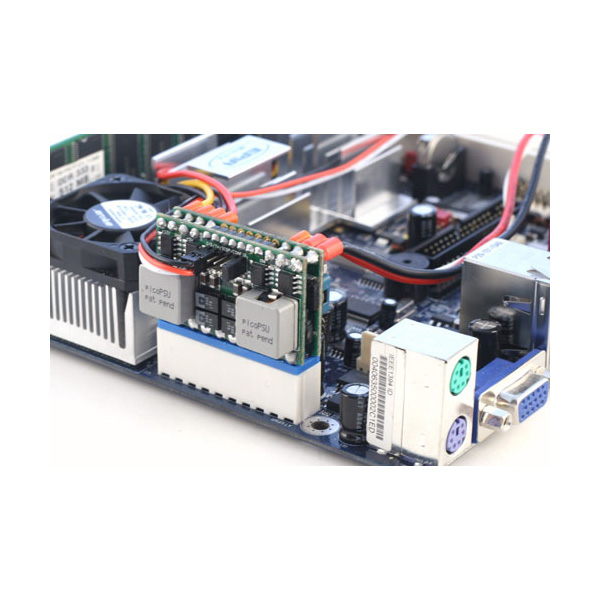
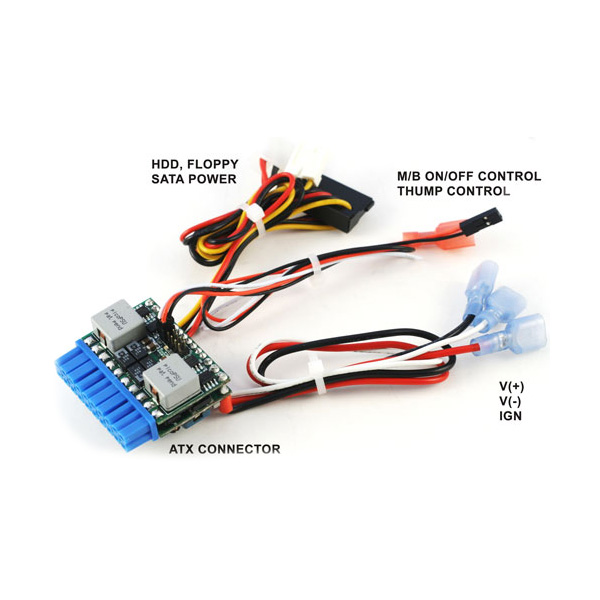
Buck chances are you could change out the powersupply in your desktop computer for one of these....


They plug into the socket.....


.... on your computers motorboard where the cables from the current powersupply plug in. You then wire it to the ship's 12 volt supply.

You can get them here....

http://www.mini-box.com/DC-DC

It is what I used for our ship's computer. You need to see what wattage your present powersupply is and get one that is equivalent such as this one....

http://www.mini-box.com/M3-ATX-DC-DC-ATX-Automotive-Computer-car-PC-Power-Supply?sc=8&category=981

Also pick one that will work on 6-24 volts like the one above and they you willl have no problems while the batteries are low or while they are high during charging. It seems complicated buy isn't and I'd be glad to help if I can.

Here is another link that would help you set it up....

http://webcache.googleusercontent.c...er+12+volt+computers&cd=5&hl=en&ct=clnk&gl=us

If you can do the above it will be the best option using the least amount of electricity with the current computer. One of the monitors I linked to above also would be a good deal for you.

Good luck,

Sum

Our Endeavour 37

Our Trips to Utah, Idaho, Canada, Florida

Our MacGregor S Pages

Mac-Venture Links
 
Apr 22, 2001
497
Hunter 420 Norfolk, VA
Bill,

It's not a laptop w/ a battery; ... it's a typical inexpensive desktop w/ the routine internal power transformer, which takes the ~115AC and converts it to ( 5v - 12v ?) DC .. but I'm not savvy enough to figure out how to take the ~12(boat)DC and wire it directly into the computer's circuitry.
But, Sumner, I'm looking into your suggestions.
I still use a desktop because it's simple, and far less expensive to just use it, as is, than any other option.
Plus, I can keep 2 on board, so that if one "dies", I can just swap "boxes" and I'm back in business.
Maybe it's old fashion, but it's inexpensive, reliable, and versatile.
 

Sumner

.
Jan 31, 2009
5,254
Macgregor & Endeavour 26S and 37 Utah's Canyon Country
....But, Sumner, I'm looking into your suggestions.
I still use a desktop because it's simple, and far less expensive to just use it, as is, than any other option.
Plus, I can keep 2 on board, so that if one "dies", I can just swap "boxes" and I'm back in business.
Maybe it's old fashion, but it's inexpensive, reliable, and versatile.
The plug in power supply would mean no inverter and would probably plug right into either computer's motherboard. The wattage should show on the power supply in both of your computers. Just pop the case off and take a look. Then order one that is big enough for the one with the larger power supply.

There isn't much to them and you are right almost all computers run on 12 vdc that is also converted into 5 vdc by the power supply. I try not to work on them on a rug due to the static elect. and touch the case first just in case I do have a charge and then I don't shuffle my feet around. I had a computer store for years and this always worked.

You can leave the existing power supply in the computer. Just unplug it at the motherboard and plug in the mini power supply. Later if you are where there is 110 unplug the one and plug the cable back in.

The mini supply will also have...


...the power cables for your computer drives (floppy if it has that, hard drive and/or CD/DVD drive) and you just unplug those cables from the current power supply and plug in the new ones. All of the plugs are indexed so that you can't screw up.

Again I would not buy one that has a straight 12 volt input, but one that has the 6-24 volt input. We like to think we have 12 volt power on board, but it can vary from under 11 if the engine is being started or the batteries are real low to over 14 if the batteries are under a charge.

Sum

Our Endeavour 37

Our Trips to Utah, Idaho, Canada, Florida

Our MacGregor S Pages

Mac-Venture Links
 
Apr 22, 2001
497
Hunter 420 Norfolk, VA
Thanks Sumner...
Looking at (one of) the computers (a slim line Dell ),
the power supply has 5 DC wire bundles coming out of it:
A large one to the mother board, as well as a smaller one,
plus sets of wires to the hard drive and to the DVD & floppy drives.
The power supply label lists them as:
+5v @ 15amps
+3.3 @ 10amps
+5 @ 2amps
+12 @ 12amps
-12 @ .5amp
Seemingly more complicated than the examples you show.
 
Jun 6, 2006
6,990
currently boatless wishing Harrington Harbor North, MD
Well alrighty then. Two desktop computers for a 42' boat. Interesting! Clearly I'm "out to lunch" on this topic. I thought I was on the bleeding edge with my Dell laptop hanging on my docking station running off ships mains power and driving the DVD/monitor using Linux software.
Going to go up on deck now and smoke a fag and drink a beer. Powering down.....halt

(Insert Jimmy Buffet music and soft combination of gurgling water and swishing breeze and a sexy First mate prancing around in a swim suit........)
Hey baby you are not going to believe what I just read on the SBO site. The guy has a backup for his desktop computer "in case the first one dies"
(Sound of beer bottle being opened)
Well honey, maybe he just likes sitting at a computer while he sails!
Could be, I can't see doing it that way but then I'm not being required to either, his boat, his choice but man.. (Sound of Zippo being flipped open) you would have a difficult time getting me to think that was more fun the this.
We should probably pray for his wife don’t you think?
 

Sumner

.
Jan 31, 2009
5,254
Macgregor & Endeavour 26S and 37 Utah's Canyon Country
Thanks Sumner...
Looking at (one of) the computers (a slim line Dell ),
the power supply has 5 DC wire bundles coming out of it:
A large one to the mother board, as well as a smaller one,
plus sets of wires to the hard drive and to the DVD & floppy drives.
The power supply label lists them as:
+5v @ 15amps
+3.3 @ 10amps
+5 @ 2amps
+12 @ 12amps
-12 @ .5amp
Seemingly more complicated than the examples you show.
That looks normal. Sorry I forgot the 3.3 volt :redface:, but the plug in supply has that. The plug in is designed to fit the boards with the 20 and/or 24 pin sockets and replaces the large bundle going to the mother board. It has the cables coming off if it that will go to the drives.

If in doubt try giving ....

http://www.mini-box.com/site/company.html

... a call on their tech line and tell them the computer you have and see which one they would recommend. If the power supply doesn't have the overall wattage on it, maybe google a replacement power supply for that model and see what wattage people are selling. I'd bet quite a bit of money though that the M3-ATX, 125w/150w would do the trick. It would supply almost 10 amps of power and if you are using that much you probably want to change computers;).

Good luck,

Sum

Our Endeavour 37

Our Trips to Utah, Idaho, Canada, Florida

Our MacGregor S Pages

Mac-Venture Links
 
Apr 22, 2001
497
Hunter 420 Norfolk, VA
THANKS Sum,
I'll call the tech guy & see what might work.

And Bill ...
every boat capt should have interchangeable boxes..... it's a safety issue.
Besides, I can play Buffet thru the desktop (w/wi-fi USB add-on) using Pandora. So,
when I get back to the boat, I'll plug in one of the boxes , mix a G&T, and toast the best boat in Harrington Harbor North .... & if that box crashes, welll....
 

Sumner

.
Jan 31, 2009
5,254
Macgregor & Endeavour 26S and 37 Utah's Canyon Country
THANKS Sum,
I'll call the tech guy & see what might work.

And Bill ...
every boat capt should have interchangeable boxes..... it's a safety issue.
Besides, I can play Buffet thru the desktop (w/wi-fi USB add-on) using Pandora. So,
when I get back to the boat, I'll plug in one of the boxes , mix a G&T, and toast the best boat in Harrington Harbor North .... & if that box crashes, welll....
Let me/us know what you end up doing.

Trying to figure out what is right computer wise just comes down to the fact that we all probably have different needs :). I'd probably take one of your older desktop computers over the most advanced laptop on the market.

I have a good laptop and Ruth has a better one. I only use them as a last resort but we do have SeaClear and the charts on them as backup.

I like a full size keyboard that I can put where it is most comfortable and I can touch type on a full size faster than either of the laptop's keyboards. I also use a mouse, which I also always use with the laptops since I can't stand the touch pads. I like a monitor separate that I can put at the best viewing angle and distance to deal with my bi-focals or tri-focals depending on which I'm wearing :cry:.

So that Ruth also doesn't have to move files, bookmarks, etc. between her laptop and desktop at home we now have her laptop sitting off to the side at home and she uses a wireless full size keyboard/mouse and the 21 1/2 inch monitor with it most of the time. Her laptop is now setup kind of like a desktop, except when she actually wants to have it on the couch or bedroom she can disconnect the monitor and use it as a laptop. It will be setup on the boat the same way. I could use my laptop the same, but I"m on the computer more and the one I made for the boat uses less juice than the laptop and has more features and is still easy to transport between the boat and house. I'll use the laptop in motel rooms on the trip still.

I feel that a person should just use what works best for them, no right computer for everyone :), and being old fashion like the flexibility you have with your boxes and they are easy to fix and buy parts for,

Sum

Our Endeavour 37

Our Trips to Utah, Idaho, Canada, Florida

Our MacGregor S Pages

Mac-Venture Links
 
Apr 22, 2001
497
Hunter 420 Norfolk, VA
Thanks Sum,
I've been running Nobeltec Vis Navigator on the desktop(s) for years... It uses NOAA raster (and vector) charts ... and IMHO, the display is clearer, more readable, and easier to use than most of the other chart plotter systems... but that's just MHO.
In any case, it allows me to split the video output and have large, inexpensive, displays at the nav station and up in the cockpit.
And... of course, the desktop is versatile, easy to use, and inexpensive... so, ....
I'll keep what I've got... and try to improve it by powering it w/ DC.
Thanks again...
 
Feb 8, 2009
118
Sabre 34 MK-1 Annapolis, MD
Thanks Sum,
In any case, it allows me to split the video output and have large, inexpensive, displays at the nav station and up in the cockpit.
Buck,

You just hit on a hot button issue for me. I sail a Sabre 34, an open boat that gets wet even with the dodger, bimini, connector, etc. I would really like to get away from the proprietary Garmin business model, that requires the huge outlay of cash just to get updated charts, when NOAA gives them away.

My problem is the display. I've not been able to come up with an affordable, effective solution for the cockpit. Even the software vendors don't have a good solution. But your words that I quoted give me hope.

How have you addressed the cockpit display?

Thanks,

Harry
 
Apr 22, 2001
497
Hunter 420 Norfolk, VA
Buck,

You just hit on a hot button issue for me. I sail a Sabre 34, an open boat that gets wet even with the dodger, bimini, connector, etc. I would really like to get away from the proprietary Garmin business model, that requires the huge outlay of cash just to get updated charts, when NOAA gives them away.

My problem is the display. I've not been able to come up with an affordable, effective solution for the cockpit. Even the software vendors don't have a good solution. But your words that I quoted give me hope.

How have you addressed the cockpit display?

Thanks,

Harry
Hi Harry,

Well, I have a full enclosure.
However, I have found that the typical inexpensive ($100-$150) ~15-17" flat screen TV that you can use in the cockpit as both a secondary monitor and as an HD TV,will last at least several seasons even as it becomes corroded by the salt environment.... especially if you remove it from the cockpit when not being used.
If spray becomes an issue while under way ( and it occasionally does for me when I leave the center forward windshield curtain open), either take it down below or temporarily cover it with plastic. Most of the time, while cruising, it's not an issue. But, I would think that you could mount a display up behind your dodger so that it's reasonably protected.
In any case when they stop working, you haven't lost much, just get a new one... I just ordered this one:
http://www.buy.com/prod/15-6-inch-n.../q/loc/111/listingid/151587986/223303928.html
(They also come in larger sizes...)
Hope this helps
 
Jun 6, 2006
6,990
currently boatless wishing Harrington Harbor North, MD
Hey Buck
Not sure if I agree it is a safety issue as you should never use just one source of navigatinal information. Course it can't hurt either.
I prefer to use the radio with geek stick aux input. One 8 MB geek stick holds about 8 hours of music.
How much current does that setup use? My radio does not even twitch the ammeter but my laptop and DVD TV/monitor suck up about 5 amps (same as a reefer!!!)
Hey Buck
Not sure if I agree it is a safety issue as you should never use just one source of navigational information. Course it can't hurt either.
I prefer to use the radio with geek stick aux input. One 8 MB geek stick holds about 8 hours of music. At $20 for three that’s a lot of music.

How much current does that setup use? My radio does not even twitch the ammeter but my laptop and DVD TV/monitor suck up about 5 amps (same as a reefer!!!)

Being on a pretty tight energy budget drives me to dedicated low power solutions like Ray marine gps and paper charts. The lat-long is available as text from the AP display then just plot it on the chart. We experimented with using the laptop as a nav computer and it is fine but after a season we found it was easier and more fun to just do eyeball nav in the Bay. Does come in handy while at port on shore power though.

SailingHarry
While in the big sandbox working for Uncle Sam we routinely used plastic bags to protect our commercial laptops from the dust and sand. If you can find one large enough you can stretch the plastic tight (tape and rubber bands and a generous mitten full use of Rube Goldberg inspiration) across the screen. The buttons are easy to get at and all you need to be sure of is the hole the mount and wires stick out. Plastic wool works for sand and might for salt spray too if a proper drip edge is constructed.
FWIW


Being on a pretty tight energy budget drives me to dedicated low power solutions like Raymarine gps and paper charts. The lat-long is avalable as text from the AP display then just plot it on the chart.
 
Status
Not open for further replies.